Key Takeaways
- Inventory and verdicts come before any platform decision.
- Parallel runs and quality tests catch what interviews miss.
- Cost budgets, monitoring and business sign-off protect the result after go-live.
- Every legacy system needs a shutdown date, or you pay for two stacks.
Data modernization advice often arrives as a long architecture document. Teams need something shorter: a few habits they can apply this quarter. These eleven are the ones I see separating programs that finish from programs that stall. Many of them sit at the center of a typical data modernization consulting engagement.
Each practice has a do and avoid line, then a short note on why it matters. The order is roughly the order I introduce them, so start at the top.
| Practice | Effort | Typical first step |
|---|---|---|
| 1. Inventory first | Low | List systems with owners and costs |
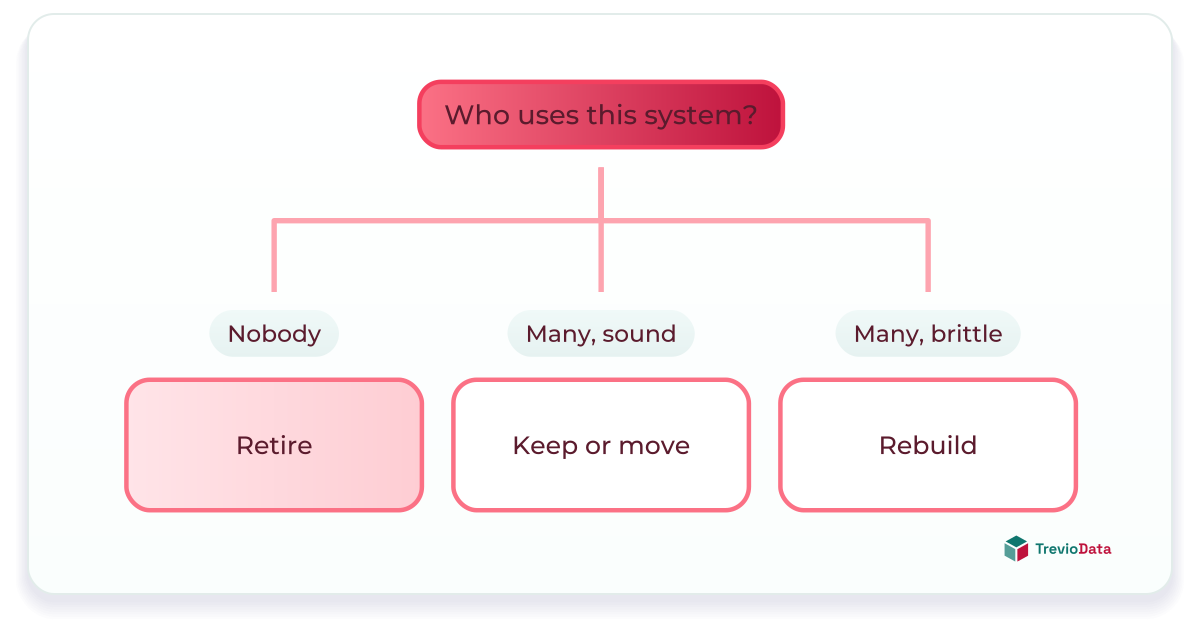
| 2. Verdicts | Low | Mark keep, move, rebuild or retire |
| 3. Contained first workload | Low | Pick one mart with a willing owner |
| 4. Parallel run | Medium | Compare totals daily for four weeks |
| 5. Quality tests | Medium | Test five key fields |
| 6. Business owner | Low | Name one per workload |
| 7. Cost budgets | Low | Record baseline and set alerts |
| 8. Monitoring | Medium | Add freshness checks to key jobs |
| 9. Version control | Medium | Move pipeline code into a repository |
| 10. People plan | Medium | Book weekly learning hours |
| 11. Shutdown dates | Low | Write an end date per legacy system |
The Eleven Practices, With What to Do and What to Avoid
Inventory before you shop
Platform choices made without an inventory tend to fit the demo and not your workload. An honest inventory also shows what you can retire, which is the cheapest saving in the program.
Do this: List every database, job, feed and report with its owner, yearly cost and downstream users before you look at any platform.
Avoid this: Picking a platform from a vendor demo and hoping the inventory will fit.
Give every system a verdict
In my client work, a visible share of tables and reports had no reader in the past year. Retiring them cuts scope before a row moves, and a written verdict stops the same argument from recurring in every meeting.
Do this: Mark each one keep, move, rebuild or retire, and write the reason and the cost of that choice.
Avoid this: Treating every system as a migration candidate by default.
Start with a contained workload
The first stage teaches your team how your migrations behave. Pick something you can afford to get slightly wrong, and save the high-stakes workloads for when your checks are mature.
Do this: Choose a single reporting mart or department feed with a willing business owner as your first migration.
Avoid this: Starting with the finance close because it is the most important.
Run old and new side by side
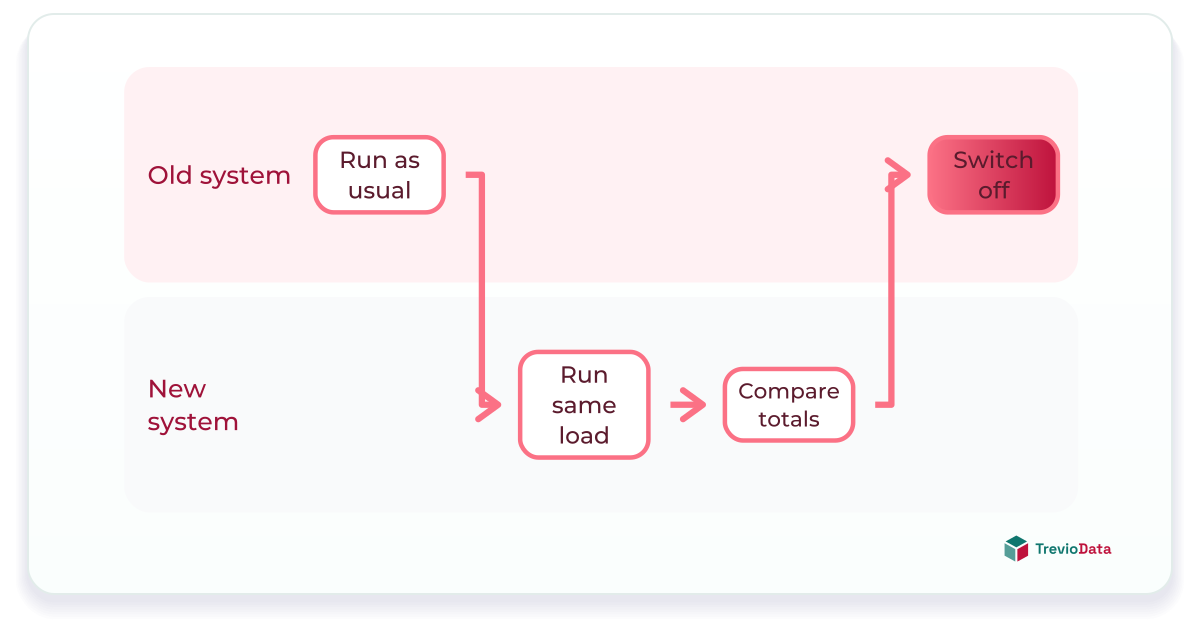
Parallel runs find the undocumented rules that no interview will. The approach follows the strangler pattern, where the new system grows around the old one until the old one has nothing left to do (Martin Fowler).
Do this: Keep both systems running for at least four weeks and compare row counts, totals and samples automatically every day.
Avoid this: Cutting over on a weekend because the test run looked fine.
Test data quality before and after
Migration moves duplicates and blanks along with everything else. Tests on key fields catch the problem while it is cheap, and a failed test should block cutover.
Do this: Write automated checks for the five most important fields and run them on the source and on the migrated data.
Avoid this: Assuming a faithful copy is a good copy.
Name a business owner for each workload
Report owners know when a number looks wrong. Their sign-off turns a technical task into a business decision, and they become your advocates with their own teams.
Do this: Give each workload an owner on the business side who tests results and signs off before cutover.
Avoid this: Leaving sign-off with the project team that built the migration.
Set cost budgets and alerts from day one
Metered platforms reward careful design and punish habits from fixed servers. A monthly review keeps the saving you promised from quietly disappearing.
Do this: Record your current run cost, set budgets on every new environment and review the most expensive queries monthly.
Avoid this: Discovering the first cloud bill after the quarter closes.
Build monitoring into every pipeline
A job that fails loudly gets fixed the same day. A job that quietly loads half the rows can distort reports for weeks, so alerts belong in the first version, not in a later phase.
Do this: Add freshness and row-count checks to each pipeline and send alerts to a named person.
Avoid this: Relying on users to tell you a dashboard is stale.
Keep transformation code in version control
Version control makes changes reviewable and reversible. It also keeps the knowledge in the company when the engineer who wrote it moves on.
Do this: Store pipeline and model code in a repository with reviews, tests and a clear history.
Avoid this: Editing logic directly in production or in a personal copy of a script.
Plan for people, not just platforms
A new stack run by old habits becomes an old stack on new hardware. The legacy team holds the rules, and the new skills hold the tools, so you need both.
Do this: Set aside weekly learning hours, pair legacy experts with new-stack engineers and agree on who is on call before go-live.
Avoid this: Hiring only for the new tools and losing the people who know the business rules.
Set a shutdown date for every legacy system
Programs pay twice until the old system is gone. Dates can move, but a date on the plan creates pressure to finish, and a short read-only period gives you a safety net. Confirm any retention duty with your advisor before deleting regulated data.
Do this: Write the end date, the archive plan and the license termination into the project plan for each replaced system.
Avoid this: Leaving the old system running just in case.
Putting the Practices in Order
You do not need all eleven at once. Here is the sequence I suggest, based on projects where the first quarter went well and a few where it did not.
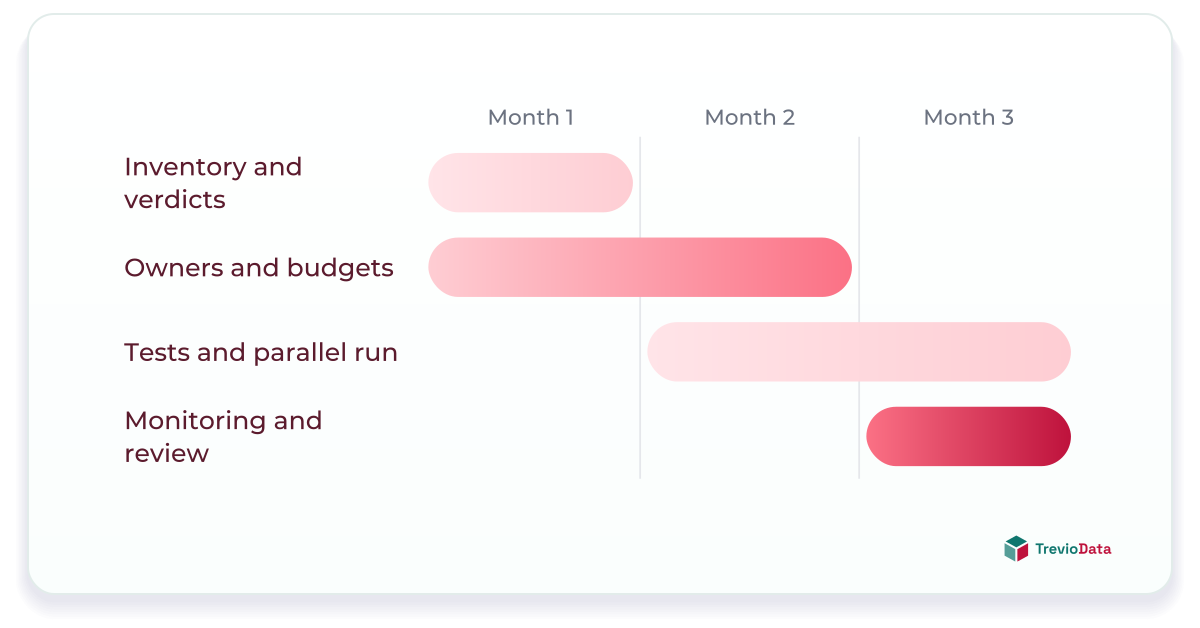
- Month one: inventory, verdicts and business owners. These cost mostly time and conversation.
- Month two: the first workload, quality tests and cost baseline.
- Month three: parallel run, monitoring and version control for that workload.
- Later: people plan, shutdown dates and repeating the cycle on the next workload.
The practices support each other. Owners receive the alerts, tests give the parallel run meaning and shutdown dates turn a good migration into a saving. The data modernization framework shows how the pieces fit into one model, and the data modernization roadmap places them on a timeline.
What Good Looks Like After a Quarter
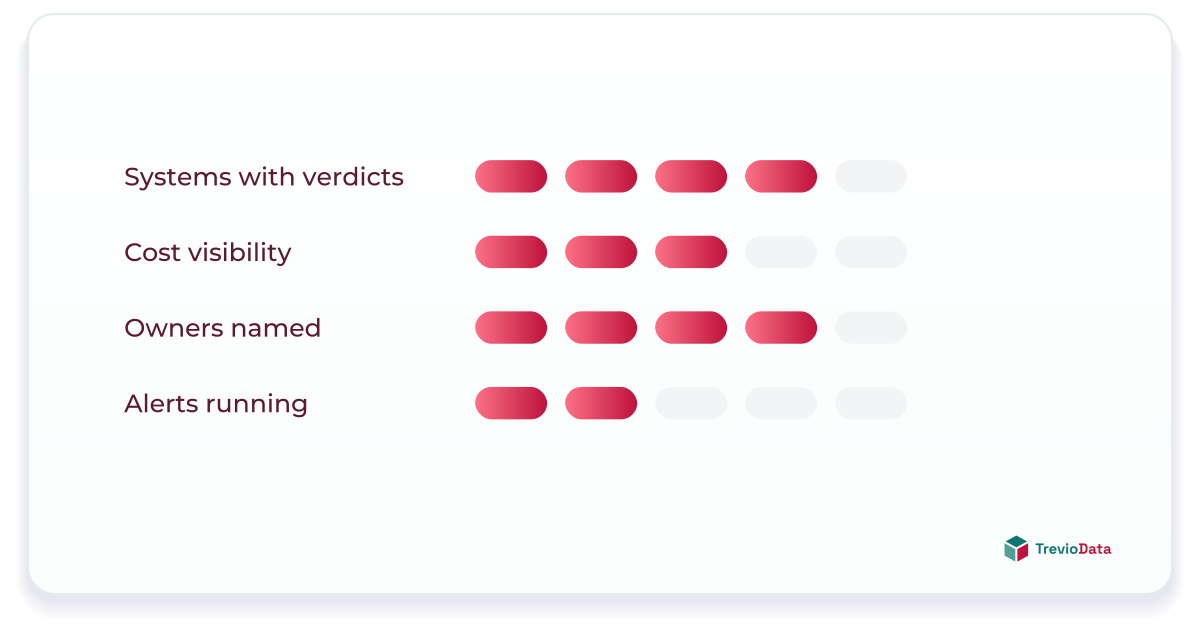
A healthy program leaves traces you can check. You have a system list with owners and costs, a verdict next to each entry and one workload running in parallel with a daily comparison. Alerts reach a named person, and the monthly report shows run cost against the baseline you recorded in week one.
You will also notice softer signs. Report owners ask for the comparison before you offer it, engineers talk about the shutdown date as a fact and the sponsor stops asking whether anything is happening. If those signs are missing after a quarter, look at practices six and eleven first, because missing owners and missing dates cause most stalls.
Do not wait for a full year to judge the work. Hold a thirty-minute review at the end of each quarter, compare the five measures with the baseline and decide which practice needs more attention. Adjust the plan in writing, so the next quarter starts from facts.
Answers to the Pushback You Will Hear
Every team raises similar objections. The first is that a parallel run slows the project down. It adds weeks, and it removes the far longer delay of a failed cutover. The second is that the inventory is boring work. It is, and it prevents the single most common surprise in these programs, a hidden dependency that breaks a report after shutdown.
The third objection is that the legacy system will be replaced anyway, so documentation is wasted. The documentation you need is only a list of rules and dependencies, and you will use it in the rebuild. The fourth is cost: most early practices need meetings and a few scheduled checks, not a new tool. Finally, some people defend workarounds that feel faster. Listen to what the workaround solves and build it into the new design.
If the objections point at real risks, take them seriously. The hurdles listed in my guide to data modernization challenges are mostly objections that came true because nobody listened.
How to Choose Your First Three Practices
Match the practice to your biggest pain today:
- If you do not know what you run, start with the inventory and verdicts.
- If a migration scared your business before, start with the parallel run and sign-off.
- If cloud bills worry you, start with budgets and the cost baseline.
- If reports fail silently, start with monitoring and quality tests.
Pick the three that match, set a date for each and review progress after thirty days. At the review, check the numbers you recorded at the start and ask whether the people who use the data noticed a difference. If the measure moved and users noticed, add the next practice. If nothing moved, you probably picked a problem that was not painful enough, so choose again. My data modernization strategy guide helps with the ranking.
Questions About Data Modernization Best Practices
What Is the Most Important Data Modernization Best Practice?
Running the old and new systems side by side before cutover. It finds undocumented rules, proves the numbers match and gives users confidence. If you adopt only one practice, adopt this one.
How Many Best Practices Should I Adopt at Once?
Start with three: the inventory with verdicts, a contained first workload and the parallel run. Add monitoring, cost controls and the rest as your first stage finishes.
Should I Use a Lift and Shift Approach?
It works for systems you want to move quickly with little change, such as a database nearing end of support. For workloads with clear problems, a rebuild usually pays off more. Decide per system and record the reason.
How Do I Convince Leaders to Fund the Program?
Add up what the old stack costs each year, including licenses, hosting and time spent on workarounds. Show the cost of the first stage and the saving it frees up. A first stage that part-funds the second is the strongest case.
What Should I Measure?
Track yearly run cost, report refresh time, failed jobs per month, time to deliver a new data request and number of legacy systems still live. Record baselines before the first migration.
Do I Need a Data Catalog to Modernize?
Not at the start. A shared inventory sheet is enough for the first stages. A catalog becomes helpful when you have many datasets and owners to load into it.
How Do I Keep Users Happy During the Change?
Involve report owners early, show them old and new results side by side and explain every difference before cutover. Keep familiar layouts and give them a named contact for the first month.
Sources
Note: This article is general information, not legal, financial or tax advice. Figures and examples are estimates based on typical projects, so check current details with your providers and advisers before you decide.
Was this article helpful?
Thank you for letting us know.
Camille leads the Trevio editorial team and works with our consultants to turn real client projects into practical guides on data strategy, engineering and governance. Before joining Trevio, she spent 11 years in data engineering and analytics roles. She has since edited more than 300 articles on data management and reviewed pipelines and platforms from over 100 client projects. She is based in Denver, Colorado.